
A ready-to-use app for moving companies
Take the inquiry, send the quote, dispatch the crew, capture a signed bill of lading, and get paid — all in one app that is already built. Add it to your workspace and start using it today. Then rename a status, add a field, or change a rule yourself, in minutes, without writing code or waiting on a developer.
Install it, use it, make it yours
This is not a blank platform you have to build on. It is a finished app for movers, and everything in it stays editable.
Add the app
Install the Moving Logistics app into your LogixFlow workspace in a few clicks. The forms, rules, automations, and document templates arrive already built.
Start using it today
Log a real customer inquiry, send a priced quote, and schedule a crew the same afternoon. There is no setup project to finish first.
Customize as you go
Notice something you would do differently? Rename it, add it, or reroute it yourself in a point-and-click panel. Changes go live immediately.
Everything a move needs, already built
Three forms follow the real journey of a move — inquiry, price, dispatch — so one customer stays one connected record from first call to final invoice.
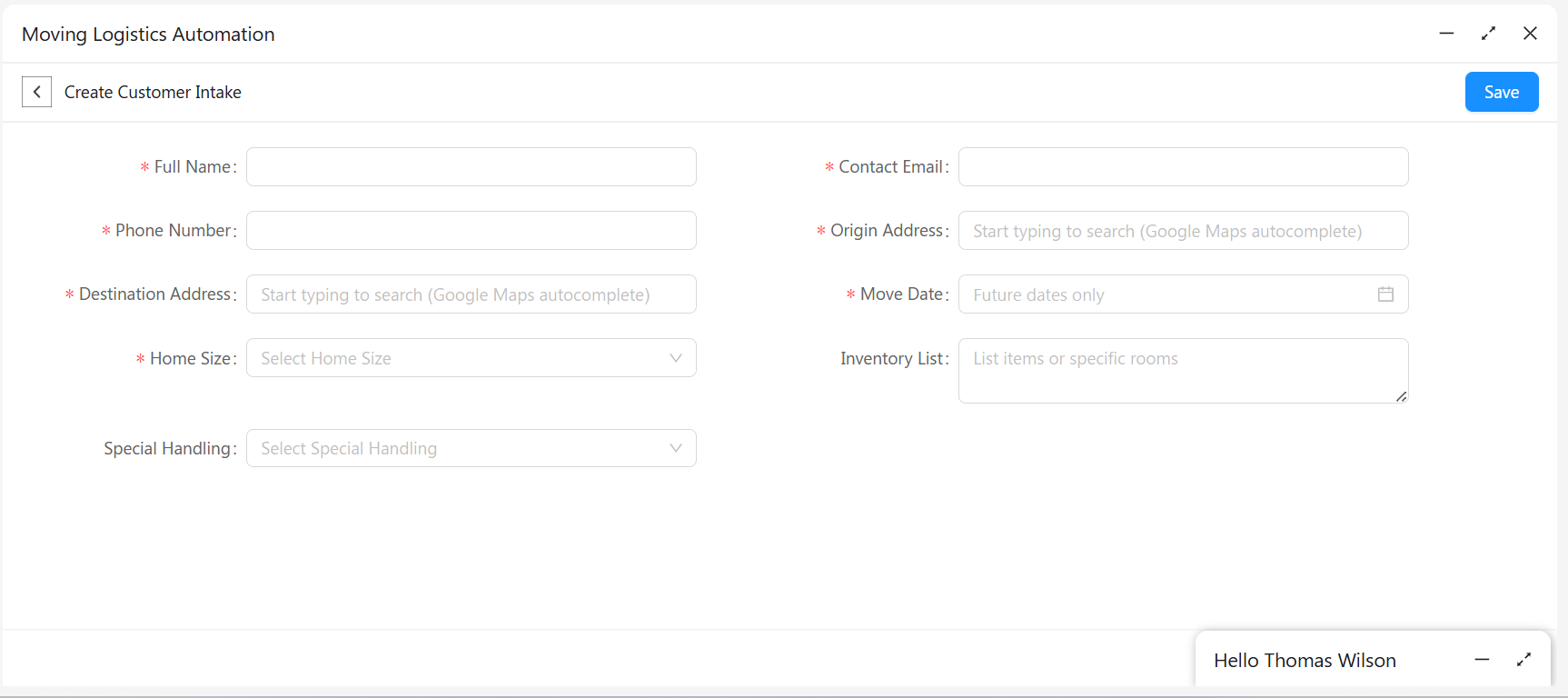
Customer Intake
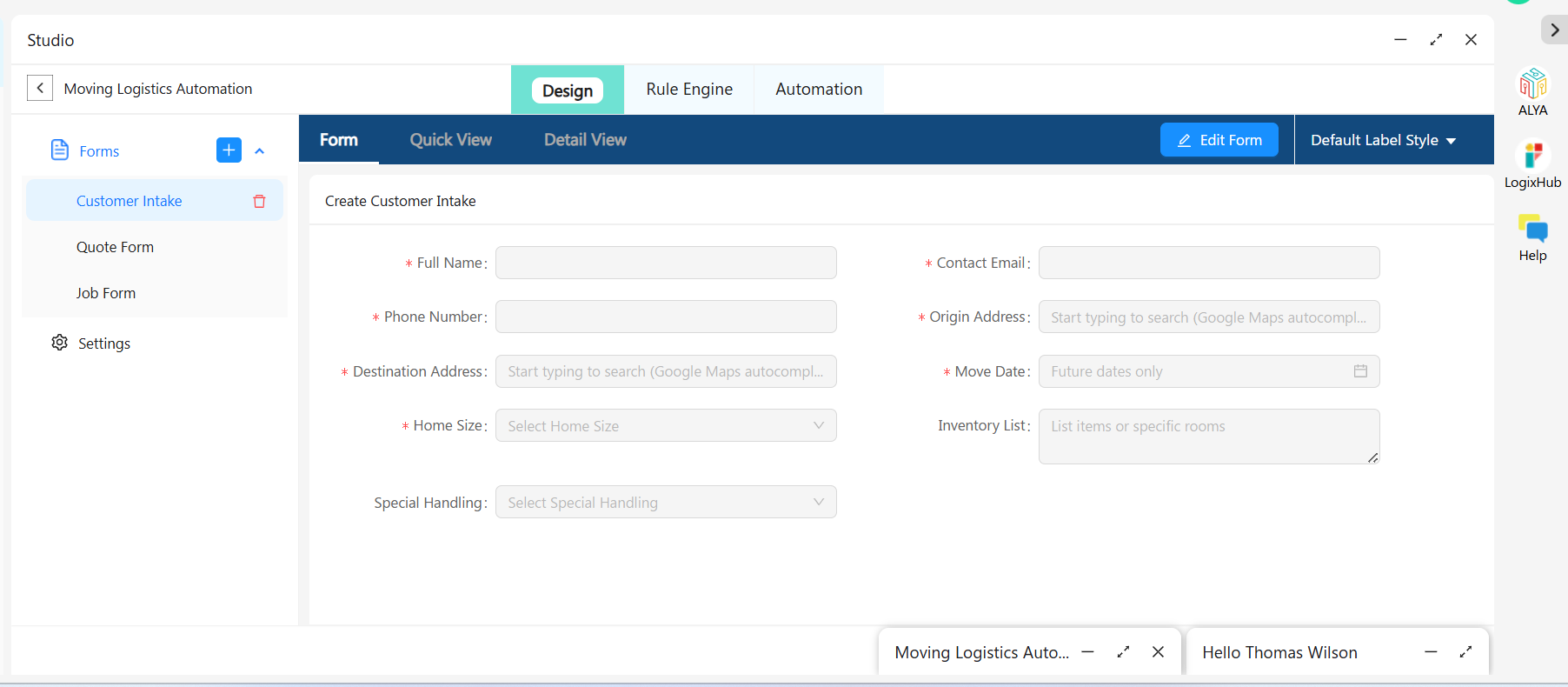
Full name, contact email, phone, origin and destination address with Google Maps autocomplete, move date, home size, inventory list, and special handling.
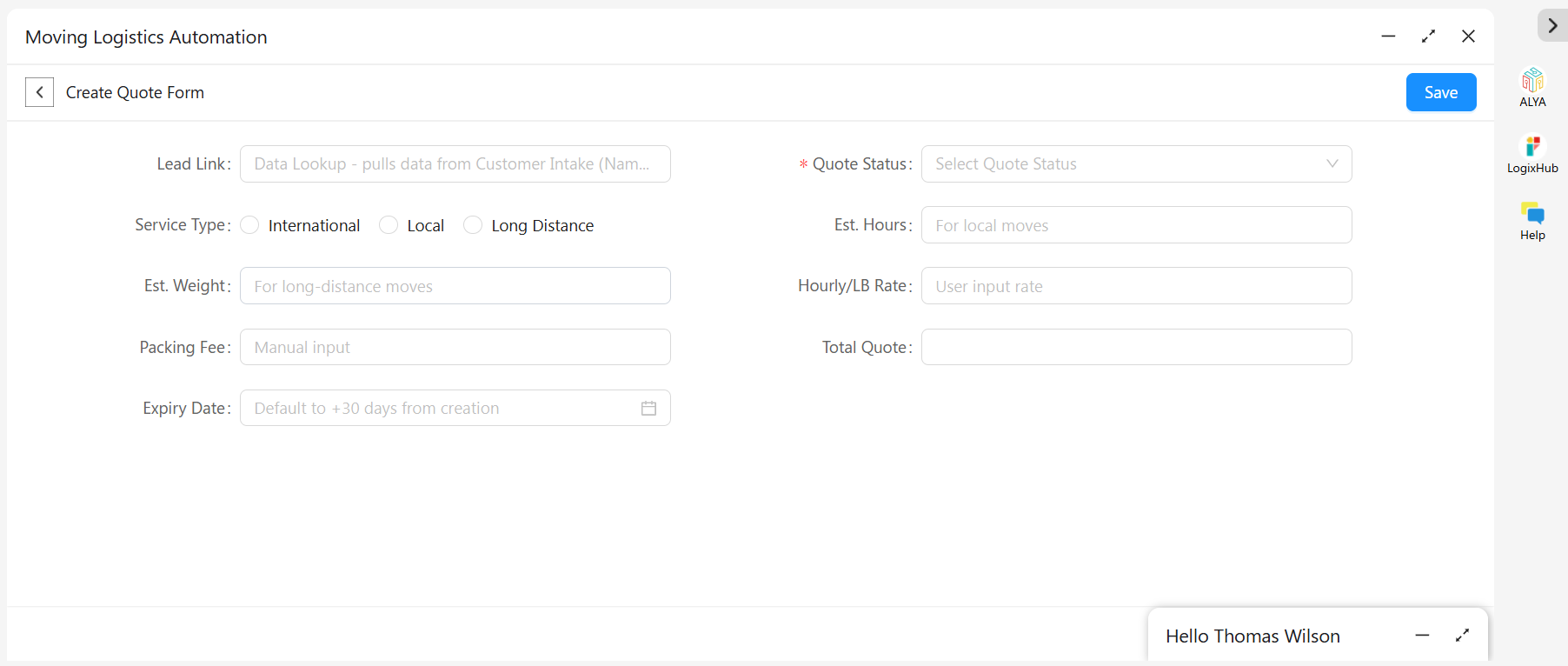
Quote Form
Service type, estimated weight or hours, hourly rate, packing fee, and a 30-day expiry date. The Total Quote calculates itself, and the Lead Link pulls the customer straight from intake.
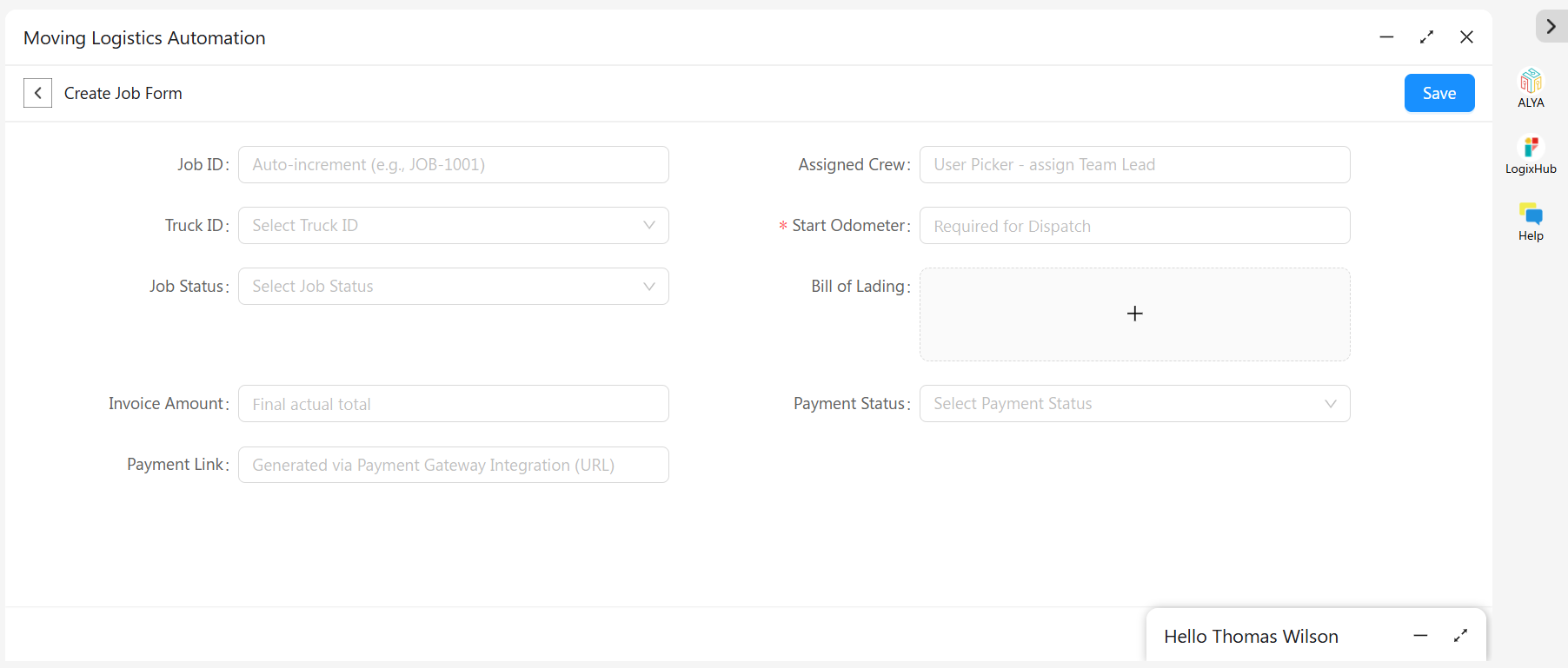
Job Form
Truck and crew assignment, job status, start odometer, an e-signature Bill of Lading, invoice amount, payment status, and an auto-generated payment link.
Change anything in minutes, not months
No two moving companies price, crew, or dispatch the same way. Every form opens in the Design tab, where whoever runs your operation can reshape it — not a developer, and not through a support ticket.
- Add, rename, or remove any field on any form
- Switch between Form, Quick View, and Detail View layouts
- Change quote and job statuses to match the words your team already uses
- Restyle labels and re-order fields by dragging them
- Every change goes live immediately, on desktop and in the mobile app
Built for the way the day actually runs
Once moves are flowing through the app, the everyday things — finding a job, pulling a report, proving what happened — are already handled.
Three ways to look at it
A clean list for quick scanning, a card view for a visual overview, or a grouped tab view that clusters jobs by status, crew, or service type.
Export and audit
Send any view to Excel in a click for payroll or reporting. Every create, edit, view, and email is logged automatically with a timestamp and user name.
Paperwork on demand
Generate a customer quote, bill of lading, or move confirmation from any record in seconds, using templates you design once in LogixDocs.
Rules that protect your process
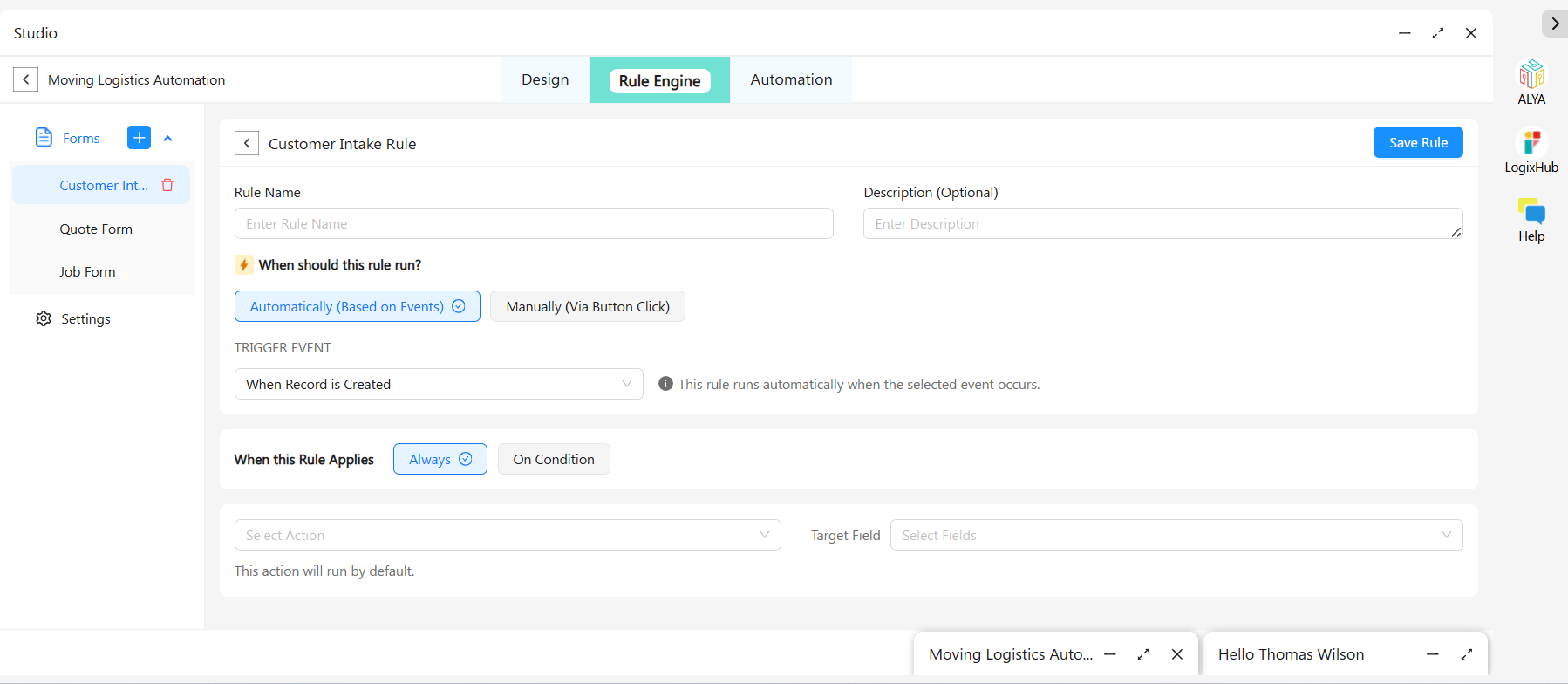
The Rule Engine enforces the things a busy dispatcher shouldn't have to remember. Each rule runs automatically on an event — when a record is created, edited, or a value changes — or manually from a button, and applies always or only when your conditions are met.
- Keep the Bill of Lading hidden until Start Odometer and crew are filled in, so no truck leaves undocumented
- Require a Total Quote above zero before a quote can be sent
- Default a quote's expiry to 30 days from creation, automatically
- Show or hide fields based on service type — estimated hours for local moves, weight for long distance
Quotes, emails, and dispatch that run themselves
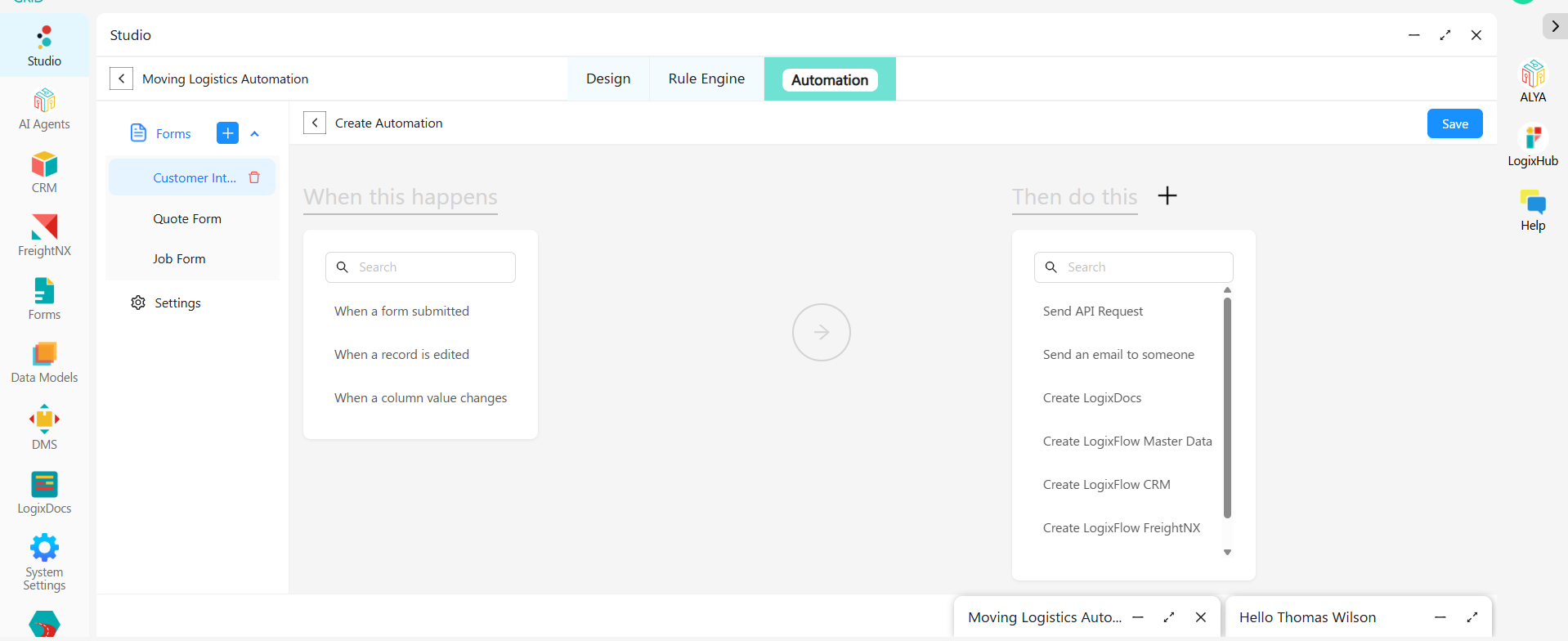
Automations are built the same plain way: pick when this happens, then pick what to do. Triggers cover form submission, record edits, and column value changes. Actions include sending an email, creating a LogixDocs document, calling an API, or creating a record in CRM, FreightNX, or elsewhere in LogixFlow.
A sales rep finishes pricing a move and changes Quote Status to Sent. The automation checks that the Total Quote is greater than zero — and from there, nobody on your team touches a keyboard again.
Connect the tools you already use
The Job Form's Payment Link is generated through your connected gateway the moment an invoice is ready, so customers can pay without a phone call. Everything else connects through the Send API Request action, with API Key, Bearer Token, or OAuth2 authentication.
Payment Gateways
Payment links generated automatically the moment an invoice is ready.
QuickBooks
Push approved jobs and paid invoices straight into your accounting ledger.
Zoho Books, ERP & in-house
Connect virtually any other system through the same REST connector.
Your crews get it on their phones too
All three forms work in LogixHub, LogixFlow's mobile app for iOS and Android. A driver can update job status, capture the customer's signature on the Bill of Lading, or check a move's inventory list from the truck — at the origin address or mid-route.
iOS
Android
Questions, answered
It is ready to use. The forms, workflows, email automations, and document templates are already built. Add the app to your LogixFlow workspace and you can take a customer inquiry, send a quote, and dispatch a crew the same day — no build phase, no implementation project.
Most changes take minutes. Adding, renaming, or removing a field, changing quote and job statuses to your own terminology, adjusting a workflow, or redesigning a quote or bill of lading are all point-and-click — and go live immediately on desktop and mobile.
A ready-made, no-code application on LogixFlow that gives moving and relocation companies one place to manage every stage of a move — from capturing a customer inquiry to quoting, dispatching, and invoicing the job.
No. Every form, view, workflow, approval, and automation is configured visually through point-and-click panels — no scripting or developer resources required.
Yes. Quote and job status transitions can be configured with conditional logic, timeout windows, and separate branches for approved, rejected, or timed-out requests, so the workflow mirrors how your operation actually runs.
Yes. It connects to payment gateways and external accounting or ERP platforms through a built-in REST API action supporting API Key, Bearer Token, or OAuth2 authentication, so invoice and payment data flow automatically into the systems you already use.
Yes. Quote emails, reminders, dispatch alerts, and fully populated documents such as bills of lading are generated and sent automatically when a record is created, updated, or approved, using dynamic placeholders to personalize each message.
Yes. Every create, update, view, and email action on a record is logged automatically with a timestamp and user identity in the record's Activity Log.
Yes. All forms are available on LogixHub for iOS and Android, so dispatch updates, e-signature capture, and status checks can happen from the truck.
Yes. Records export to Excel directly from any view, for payroll runs, compliance reporting, or leadership updates.
Run your next move through it this week.
The app is already built. Add it, use it, change whatever you want — free to start, no credit card.