A ready-to-use app for ecommerce returns teams
Scan the package at the dock, photograph its condition, notify the customer, track it through storage, and hand it to a carrier — all in one app that is already built. Add it to your workspace and start using it today. Then rename a status, add a field, or change a rule yourself, in minutes, without writing code or waiting on a developer.
Install it, use it, make it yours
This is not a blank platform you have to build on. It is a finished app for returns operations, and everything in it stays editable.
Add the app
Install the Reverse Logistics app into your LogixFlow workspace in a few clicks. The form, rules, automations, and document templates arrive already built.
Start using it today
Scan a real return at the dock this afternoon, send the customer their confirmation, and log a carrier handoff. There is no setup project to finish first.
Customize as you go
Notice something you would do differently? Rename it, add it, or reroute it yourself in a point-and-click panel. Changes go live immediately.
Everything a return needs, already built
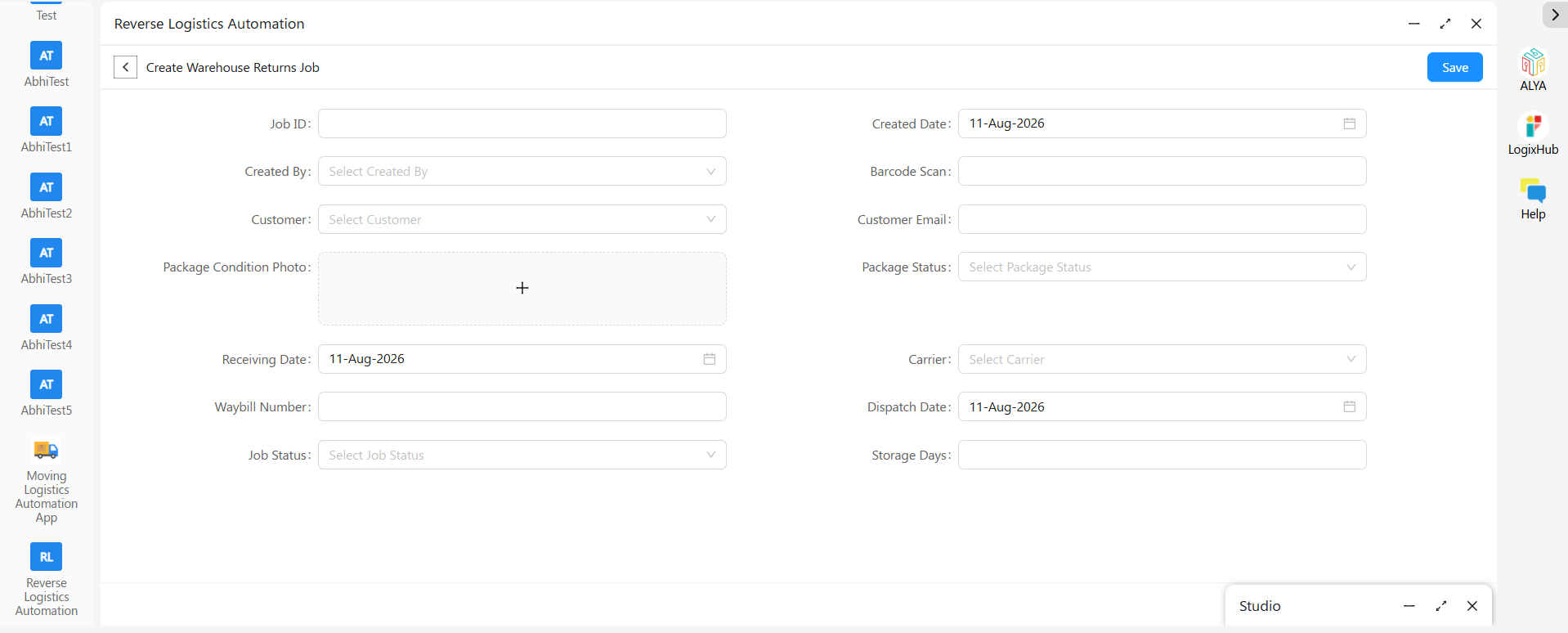
One Warehouse Returns Job Form, in three stages that mirror the real journey of a returned item — dock door, storage, carrier handoff — so one package stays one connected record from arrival to closed case.
Inbound Control
Auto-generated Job ID, a barcode scanned straight from a phone camera, customer name and email pulled from your Customer Master, a required condition photo, and Package Status — Damaged, Intact, Wrong Item, or Refurbished.
Dispatch Section
Carrier, Waybill Number, and Dispatch Date, captured as the item leaves — and locked until the return has actually been received and given a storage status.
Metrics & Rules
A Storage Days formula that calculates warehouse aging from Receiving Date to Dispatch Date, and Job Status tracking through Draft, Received, In-Storage, Dispatched, and Closed.

Change anything in minutes, not months
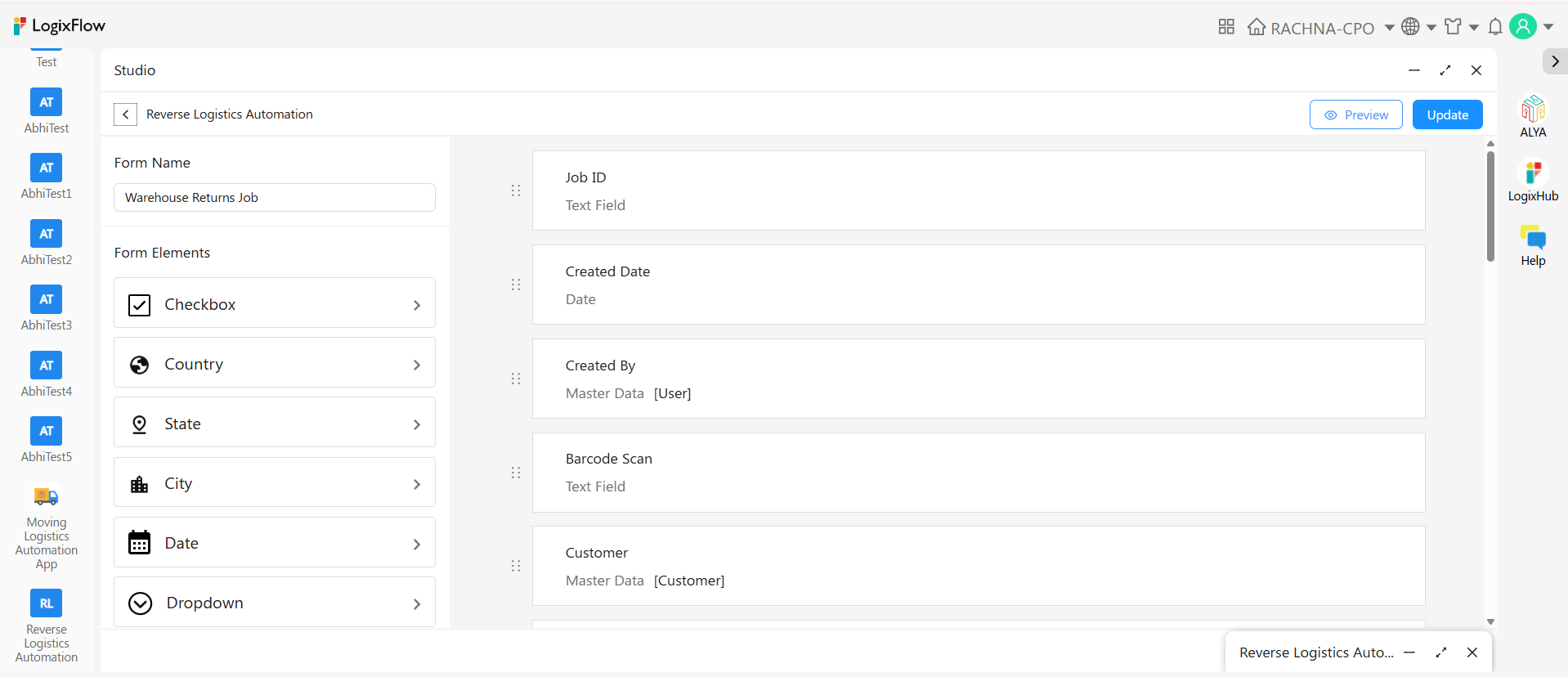
No two returns operations grade, store, or dispose the same way. The form opens in the Design tab, where whoever runs your warehouse can reshape it — not a developer, and not through a support ticket.
- Add, rename, or remove any field on the form
- Switch between Form, Quick View, and Detail View layouts
- Change package and job statuses to match the words your team already uses
- Restyle labels and re-order fields by dragging them
- Every change goes live immediately, on desktop and on the warehouse floor
Built for the way the day actually runs
Once returns are flowing through the app, the everyday things — finding a package, pulling a report, proving what happened to an item — are already handled.
Three ways to look at it
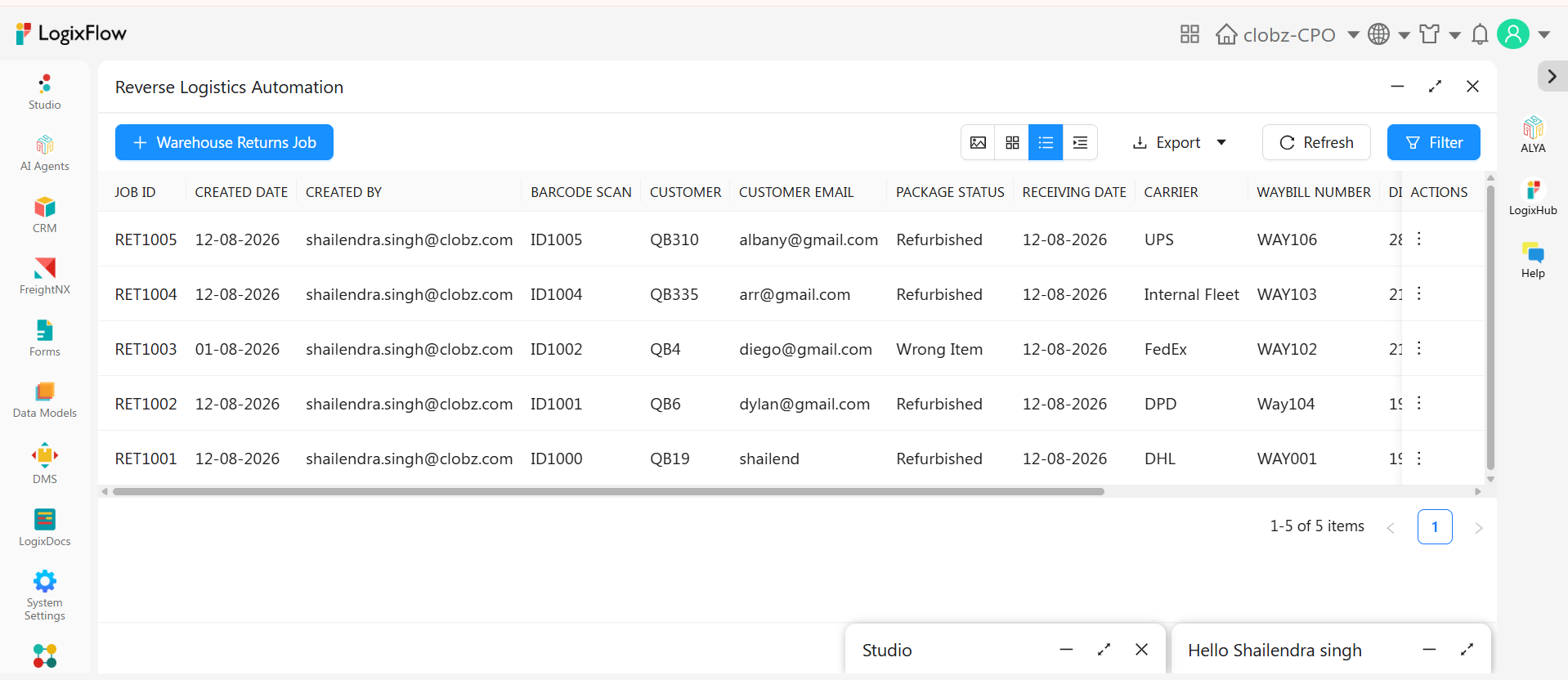
A clean list for quick scanning, a card view for a visual overview, or a grouped tab view that clusters returns by job status, carrier, or warehouse location.
Export and audit
Send any view to Excel in a click for reporting or reconciliation. Every create, edit, view, and email is logged automatically with a timestamp and user name.
Paperwork on demand
Generate a return receipt, disposition certificate, or carrier handoff summary from any record in seconds, using templates you design once in LogixDocs.
Rules that protect your process
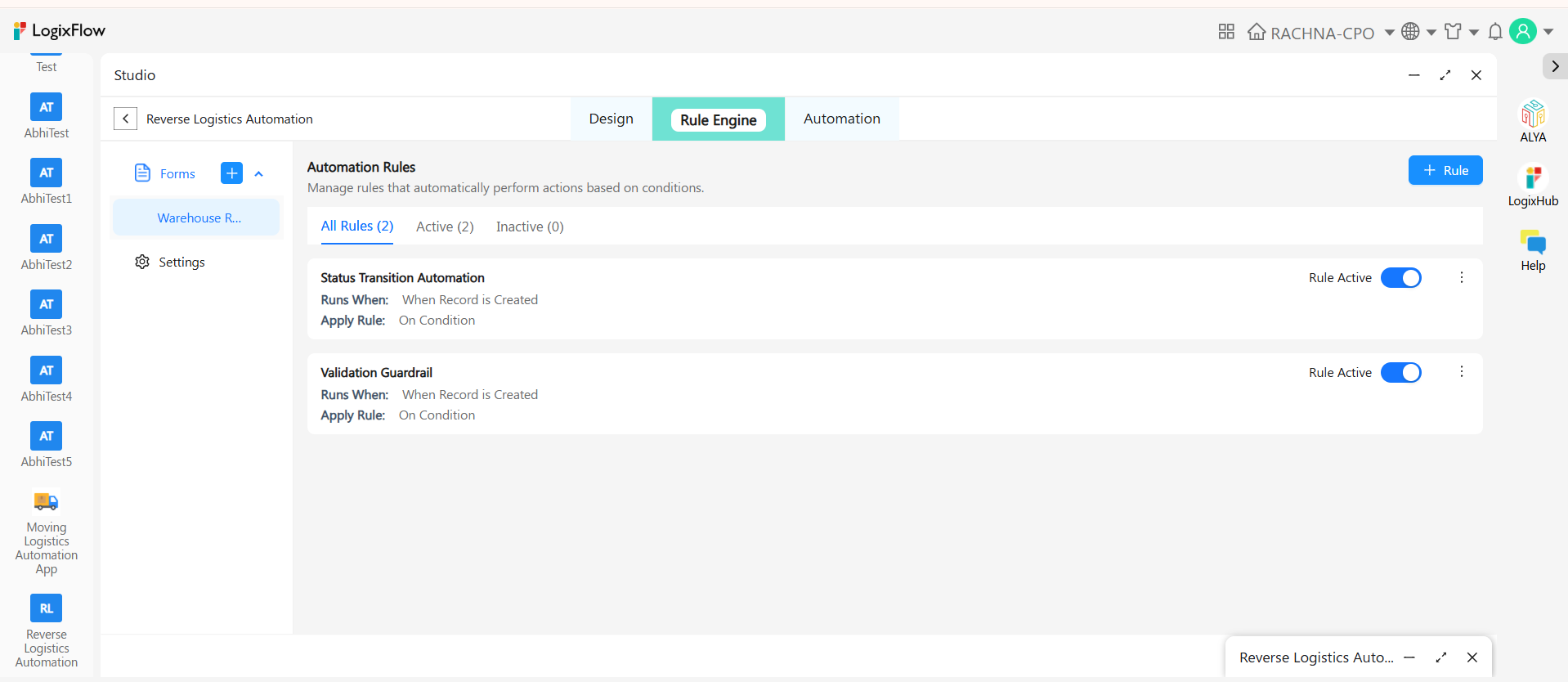
The Rule Engine enforces the things a busy warehouse shouldn't have to remember. Each rule runs automatically on an event — when a record is created, edited, or a value changes — or manually from a button, and applies always or only when your conditions are met.
- Keep the whole Dispatch Section locked until the return has been acknowledged as received
- Require a condition photo before a package can be marked Received
- Check the customer email isn't blank before a notification goes out
- Move Job Status to Dispatched on its own once carrier and waybill are saved
Scans that trigger everything else
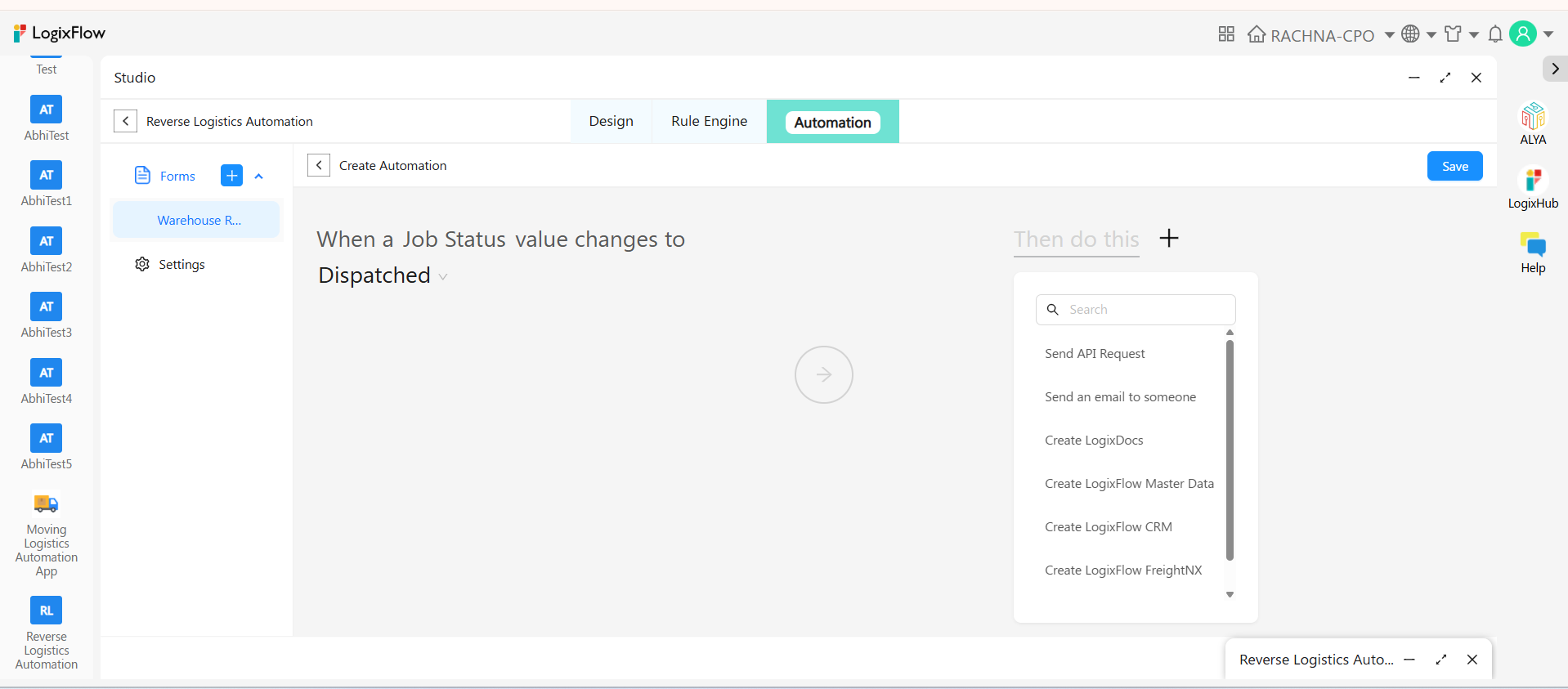
Automations are built the same plain way: pick when this happens, then pick what to do. Triggers cover form submission, record edits, and column value changes. Actions include sending an email, creating a LogixDocs document, calling an API, or writing to a live Google Sheet.
An operator scans a returned package on their phone the moment it arrives, snaps the required condition photo, and sets Package Status to Intact. Job Status changes to Received — and nobody on your team touches a keyboard again.
Your merchants see it without logging in
Ecommerce merchants shouldn't have to learn another system just to find out what happened to a return. The Send API Request action pushes every scan, status change, and dispatch update wherever it needs to go — with API Key, Bearer Token, or OAuth2 authentication.
Google Sheets
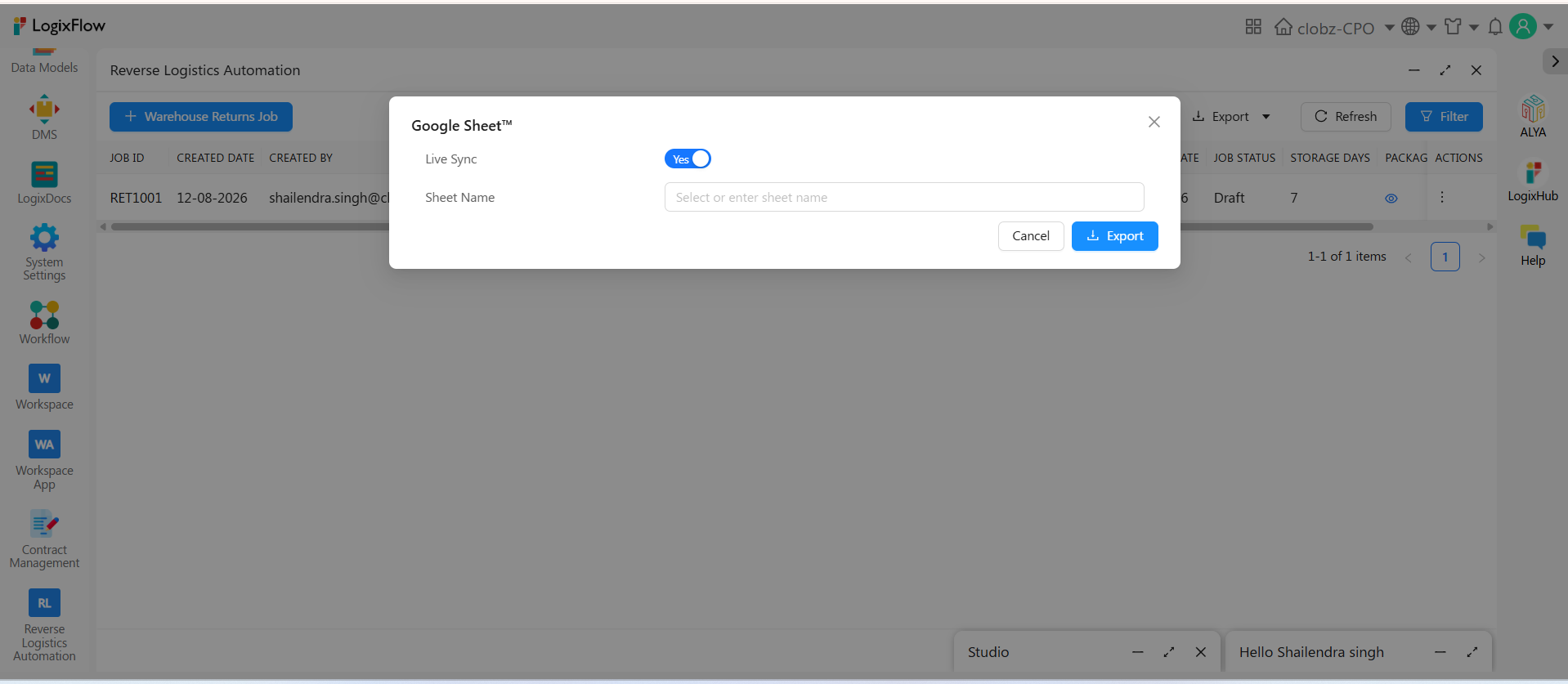
Every update flows into a live merchant sheet they can filter and chart — no manual export, no nightly batch.
Google Drive
Route condition photos straight into a shared folder your team already uses.
Gmail
Send customer notifications through your own mailbox, configured in the same no-code builder.
Every phone on the floor is a scanning station
The Warehouse Returns Job Form works in LogixHub, LogixFlow's mobile app for iOS and Android. Operators scan a barcode and capture the required condition photo straight from a phone camera the moment a return crosses the dock — no separate scanner hardware — while the back office works the same record on desktop.
iOS
Android
Questions, answered
It is ready to use. The form, rules, email automations, and document templates are already built. Add the app to your LogixFlow workspace and you can scan a return, notify the customer, and log a dispatch the same day — no build phase, no implementation project.
Most changes take minutes. Adding, renaming, or removing a field, changing package and job statuses to your own terminology, adjusting a rule, or redesigning a disposition certificate are all point-and-click — and go live immediately on desktop and mobile.
A ready-made, no-code application on LogixFlow that gives warehouse and returns teams one place to manage every stage of a return — from mobile barcode scanning at receiving, through storage aging, to final carrier dispatch.
No. Every form, view, rule, and automation is configured visually through point-and-click panels — no scripting or developer resources required.
Yes. The Warehouse Returns Job Form is available on LogixHub for iOS and Android, so operators can scan a barcode and capture the required condition photo directly from a phone camera.
Yes. The moment Job Status changes to Received, a confirmation email is generated automatically with the barcode, package status, and receiving date, and the condition photo attached — provided the customer email and photo are present.
Yes. Return records are pushed automatically into a live Google Sheet through the built-in Google Workspace integration, so merchants see up-to-date status from a spreadsheet they already have access to — with no manual export step.
Yes. Status transitions, validation guardrails, and dispatch triggers are all configured visually and can be adjusted to mirror your own receiving and dispatch process.
Yes. Every create, update, view, and email action on a record is logged automatically with a timestamp and user identity in the record's Activity Log.
Yes. Records export to Excel directly from any view, in addition to the live Google Sheets feed available to merchants.
Scan your next return into it this week.
The app is already built. Add it, use it, change whatever you want — free to start, no credit card.