Forklift Management App: Inspections, Maintenance, Rentals and Safety

The Forklift Management App is a LogixFlow application, made by LogixGRID Technologies, for businesses that sell, rent or service forklifts and for teams that run their own fleets. The Forklift Management App holds forklift inventory, customers, sales and rental orders, maintenance, parts, warranty, usage and safety records in 21 forms in one workspace.

21forms in one app
10fields on every forklift record
6usage-tracking forms
2order types, sale and rental

What Does The Forklift Management App Do?

Records about forklifts, customers, orders, service and safety all sit in one workspace in the Forklift Management App. It takes 21 forms in six groups. Open one, fill it in, save it.

01

Fleet Inventory

Forklift Inventory Management holds the master record: ID, serial number, model, brand, year, capacity in tons, specifications, status, purchase date and cost.

02

Customers And Sales

Customer Management stores contact and tax details. Sales Order Management records each sale with discount, tax and invoice number. Pricing and Discount Management is a separate form.

03

Rentals

Rental Rate Management, Forklift Rental Inventory Management, Rental Order Management and Rental Period Management. A rental order carries dates, amount, agreement number and payment status.

04

Service And Parts

Maintenance Scheduling, Service History Management, Parts Inventory Management and Warranty Management. A maintenance entry names a type, a due date and a technician.

05

Usage Tracking

Forklift, Operator, Shift, Hour Meter, Odometer and Fuel Consumption Tracking. Hour readings capture hours used today and total hours.

06

Safety And Compliance

Safety Incident Tracking, Compliance Tracking and Vehicle Inspection Tracking. An incident records its date, details, the action taken and a status.

What Does Each Form In The Forklift Management App Capture?

Each of the 21 forms in the Forklift Management App does one job. The tables below say what that job is and what you record in it.

FormWhat it does for you
Forklift Inventory ManagementGives every forklift one master record, so serial number, brand, capacity and purchase cost sit in one place instead of across several spreadsheets.
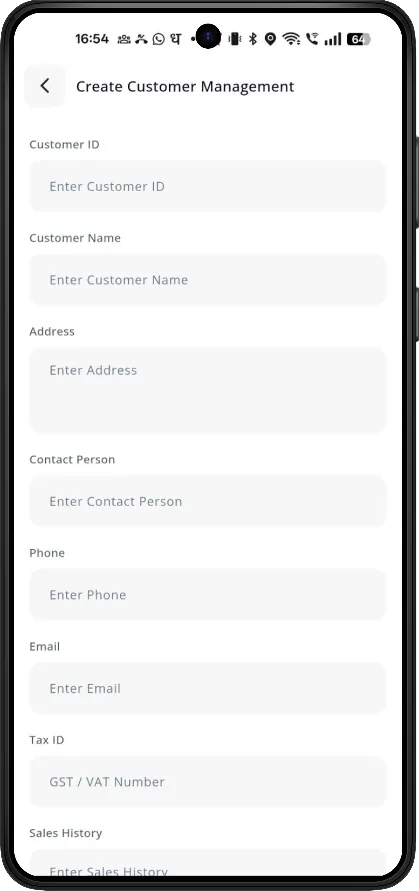
Customer ManagementKeeps each customer's contact person, phone, email and tax ID on one record, so the rental desk and the sales team work from the same details.
Sales Order ManagementRecords each sale with its discount, tax and invoice number, so the price and the payment status of every deal live in one entry.
Rental Order ManagementTies a forklift and a customer to an agreement number and a rental period, so you know what's out, with whom and until when.
Maintenance SchedulingPuts a due date and a named technician against each service job, so planned maintenance doesn't depend on someone remembering it.
Hour Meter TrackingLogs hours used each day and the running total for every forklift, which gives you real usage figures to plan servicing around.
Safety Incident TrackingKeeps the date, the details and the action taken for every incident on a forklift, so there's a written record when someone asks what happened.
Pricing and Discount ManagementHolds your pricing and discounts in one form, so a quote doesn't depend on whoever remembers the last deal.
Rental Rate ManagementKeeps rental rates in one place, so everyone quoting a rental starts from the same numbers.
Forklift Rental Inventory ManagementKeeps the rental fleet as its own list, so you can see what you have available to rent.
Rental Period ManagementRecords the length of each rental period, so rental terms are written down and not remembered.
Service History ManagementBuilds a service history for each forklift, so a technician can see what was done before starting new work.
Parts Inventory ManagementLists the spare parts you hold, so the workshop checks the shelf before it places an order.
Warranty ManagementRecords warranty details per forklift, so a repair claim starts with the paperwork already in hand.
Forklift TrackingGives you one place to follow each forklift across the fleet.
Operator TrackingRecords who runs each forklift, so usage and incidents can be traced to a person.
Shift TrackingRecords which shift a forklift worked, so usage can be read shift by shift.
Odometer TrackingLogs distance readings per forklift, so travel is recorded and not estimated.
Fuel Consumption TrackingLogs the fuel each forklift uses, so running costs are on record.
Compliance TrackingKeeps compliance records in one form, so an audit question gets answered from the system and not from a filing cabinet.
Vehicle Inspection TrackingRecords vehicle inspections, so a missed check shows up as a gap in the record.

How Does The Forklift Management App Handle Rental And Sales Orders?

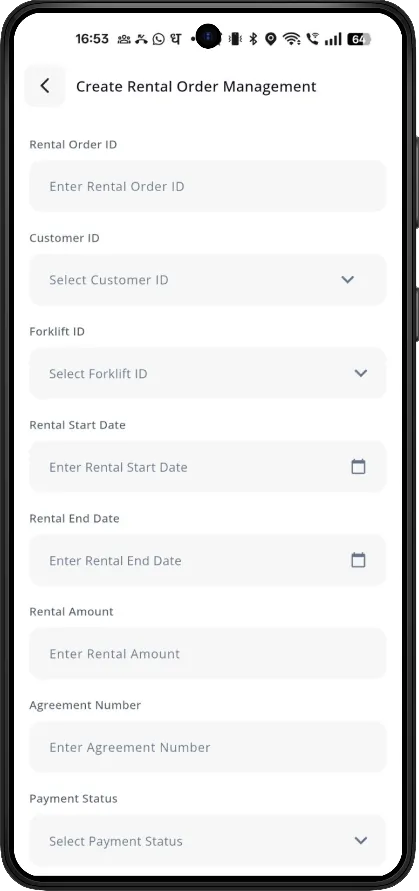
The Forklift Management App records a rental on the Rental Order Management form and a sale on the Sales Order Management form. Both let you pick the forklift and the customer from a list, so you aren't retyping names on every order.

  • A rental order carries a start date, an end date, a rental amount and an agreement number.
  • A sales order swaps the dates for an order date and a delivery date, and adds discount, tax and an invoice number.
  • Both end with a payment status you choose.
  • A free-text remarks box sits at the bottom of each.

We kept sales and rentals as two forms on purpose. A rental has an end date and a sale has a delivery date, and a single combined form would leave half its fields empty on every order.

screenshot of the Create Rental Order Management form showing Rental Order ID, Customer ID, Forklift ID, Rental Start Date, Rental End Date, Rental Amount, Agreement Number, Payment Status and Remarks

Forklift Maintenance Schedules, Hour Meters and Service Logs

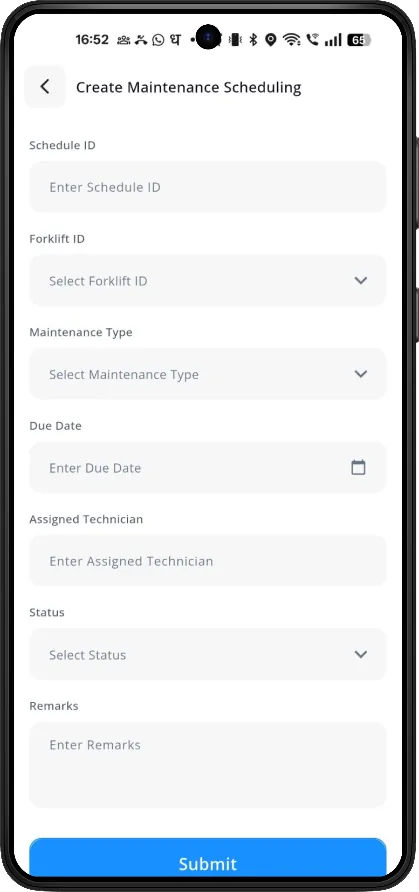
The Forklift Management App tracks maintenance on the Maintenance Scheduling form and usage on six tracking forms. A maintenance entry names the forklift, the maintenance type, a due date and the assigned technician. Hour Meter Tracking logs the date, hours used today and total hours.

  • Service History Management, Parts Inventory Management and Warranty Management sit beside it as separate forms.
  • Odometer Tracking and Fuel Consumption Tracking cover distance and fuel, while Operator Tracking and Shift Tracking cover the people and the shifts.
screenshot of the Create Maintenance Scheduling form showing Schedule ID, Forklift ID, Maintenance Type, Due Date, Assigned Technician, Status and Remarks

Digital Daily Forklift Inspection Checklist

A daily forklift inspection checklist is the pre-shift check an operator completes before driving. The Forklift Management App keeps that check on a form instead of a clipboard, so every operator answers the same questions and the answers are saved against the forklift ID. The result is a forklift inspection form you can search later, not a paper sheet in a drawer.

01

Forks and mast

Look for cracks, bends and wear on the forks, and check that the mast raises and lowers smoothly.

02

Chains and hydraulics

Check the lift chains and look for hydraulic leaks or damaged hoses.

03

Brakes, steering and horn

Test the brakes and steering, and make sure the horn works before the forklift leaves the bay.

04

Lights, alarms and tires

Check lights, backup alarm and tire condition, and note any body damage.

05

Electric forklift inspection checklist

Add the battery, charger and cable checks that only apply to an electric forklift.

06

LPG forklift checks

Add the tank, hose and valve checks that only apply to a propane forklift.

  • Use the Vehicle Inspection Tracking form for the daily check, with one entry per forklift per shift.
  • Operators can complete it on a phone through LogixHub, the LogixFlow mobile app for Android and iOS, so this works as a forklift inspection checklist app on the shop floor.
  • LogixFlow is no-code, so you can add a photo field and a pass or fail choice in the builder, and set up a workflow that creates a Maintenance Scheduling entry when a check fails.

Forklift Maintenance Checklist and Schedule

Paper log books go missing and never remind anyone that a service is due. In the Forklift Management App the Maintenance Scheduling form holds the forklift, the maintenance type, a due date, the assigned technician, a status and remarks, and Service History Management keeps a record of what was done.

  • Hour Meter Tracking keeps the running total of hours for each forklift, so whoever plans service can read the hours and book the next entry when the forklift reaches your service interval.
  • A forklift maintenance checklist for oil or battery checks, lubrication, hoses, tires and brakes can sit in the remarks or in extra fields on each entry.
  • A forklift maintenance schedule template or log book becomes a list of Maintenance Scheduling and Service History entries you can look up by forklift.

If your workshop services more than forklifts, see our workshop management software. Teams that also run vehicles can read about auto repair shop and garage management.

Inspection and record rules differ by province. For example, Ontario publishes Regulation 851 for industrial establishments, and Alberta publishes forklift health and safety best practices. Check the current text for your province. The app keeps a searchable log, and this page is not legal advice.

What Does One Forklift's Record Trail Look Like In The Forklift Management App?

The Forklift Management App spreads one forklift's history across several forms, and each form answers one question.

Illustrative example

Say a forklift goes out on a two-week rental. The rental desk fills in a Rental Order with the agreement number, the start and end dates and the rental amount. While it's out, someone logs hours used each day. When it comes back, a service gets booked with a due date and a technician.

Rental Order Management → agreement number, dates, amount
Hour Meter Tracking → hours used today, total hours
Maintenance Scheduling → due date, technician

Who Uses It: Warehouses, Forklift Dealers and Rental Yards in Canada

The Forklift Management App is for businesses that sell, rent or service forklifts, and for teams that run their own fleets. If your forklift records live in a spreadsheet, a service diary and a pile of rental agreements, you're the reader we had in mind.

  • Rental desk staff create rental orders.
  • Sales staff record customers and sales.
  • Technicians and workshop leads schedule and log maintenance.
  • Fleet and safety managers follow usage, incidents and compliance.
screenshot of the Create Customer Management form showing Customer ID, Customer Name, Address, Contact Person, Phone, Email, Tax ID, Sales History and Service History

Forklift Management Software FAQs

The Forklift Management App is a LogixFlow application from LogixGRID Technologies for forklift dealers, rental companies and fleet teams. It gives you 21 forms covering forklift inventory, customers, sales and rental orders, maintenance, parts, warranty, usage tracking, safety incidents and compliance, so those records sit in one workspace instead of several spreadsheets.

The Forklift Management App is for businesses that sell, rent or service forklifts, and for teams that run their own fleets. Rental and sales staff use the order forms, technicians use Maintenance Scheduling, and fleet or safety managers use the tracking, incident and compliance forms.

Yes. Rentals go on the Rental Order Management form, with start and end dates, rental amount, agreement number and payment status. Sales go on Sales Order Management, which adds delivery date, discount, tax and invoice number. Both forms pick the customer and the forklift from a list, so each order points at an existing record.

Each forklift record in the Forklift Management App has 10 fields: Forklift ID, serial number, model number, brand, year of manufacture, capacity in tons, specifications, status, purchase date and purchase cost. Other forms, such as maintenance, hour meter and safety incidents, refer back to the forklift by its ID.

Maintenance Scheduling records a schedule ID, the forklift, the maintenance type, a due date, the assigned technician, a status and remarks. The Forklift Management App also has separate forms for service history, parts inventory and warranty, so a repair, the parts and the warranty position can each be logged on their own.

Hour readings are typed into Hour Meter Tracking as the date, hours used today and total hours, so accuracy depends on whoever enters the figure. Odometer Tracking and Fuel Consumption Tracking are separate forms in the Forklift Management App for distance and fuel.

Safety Incident Tracking records an incident ID, the forklift involved, the incident date, the details, the action taken and a status. Compliance Tracking and Vehicle Inspection Tracking are separate forms in the Forklift Management App for compliance and inspection records.

Yes. LogixFlow apps open on LogixHub, the LogixFlow mobile app for Android and iOS, so an operator with a user account can fill in the inspection form on a phone at the start of a shift.

It can hold the inspection record in place of a paper log, because the Vehicle Inspection Tracking and Compliance Tracking forms keep entries searchable by forklift. Whether a digital record meets your province or your insurer depends on their wording, so check the current rules. This is not legal advice.

Yes. The forklift record has a Specifications field where you can note the power type, and you can add the checks that suit each one to the inspection form: battery, charger and cables for electric, and tank, hose and valve for LPG. Fuel Consumption Tracking is a separate form for fuel use.

The records stay searchable in the app, so an auditor question can be answered from the system. For a file export, ask the LogixFlow team which export options your plan includes.

Put One Forklift Through It This Week.

Add a forklift, raise a rental order against it and log its hours.

Ready to Transform Your Business with No-Code Automation?

Experience the power of LogixFlow and revolutionize the way you work.

Canada | India | Malaysia | Mexico | UAE

Contact Us

+1-431-336-9944 sales@logixgrid.com

Cold Never Cooled Our Passion: Designed with {❤️} in Winnipeg

© 2026 LogixGrid Technologies (Canada) Inc. All Rights Reserved.

All product names, logos, and brands are property of their respective owners.

All company, product, and service names used on this website are for identification purposes only.